How to Install Elastic Search: A Step-by-Step Guide
Step-by-step guide to install Elastic Search

How to install Elastic Search
This is my first blog as a part of ELK stack series. As the first blog in this series, I’ll showing how to install Elastic Search, configure it, Start the service and get a response from it.
Pre Requisites
Elasticsearch is built using Java, and includes a bundled version of OpenJDK within each distribution. So make sure java is already installed on the machine.
Installation
Easy, Search for Install Elastic Search and go with the first link you see. Here is what comes today from elastic, the company behind this service. Depending on your platform, download the .gz or .deb or .zip file.
Installation on Windows
Well, its simple and Hard.
Simple: Extract the zip file.
Hard: Wait forever for the extraction to complete or at least as on today. I strongly recommend you to do the extraction when you can afford few hours of downtime or away time from your machine.
Post Extraction Steps for Windows
Set the path
Copy the path where the file is extracted (Example path below) and map it to an new system or user variable.

| Key | Value |
| ES_JAVA_HOME | C:\somepath\elasticsearch\elasticsearch-8.15.2\jdk |
Update config
Navigate to
elasticsearch\elasticsearch-8.15.2\configOpen
elasticsearch.ymlfile in your fav editorUncomment & change the details as below.
# The placeholders are already there in the yml file.
# Change values accordingly.

cluster.name: my-test-application
node.name: windows-node-1
network.host: 127.0.0.1
# 127.0.0.1 or you can use ipconfig and take the ip address
cluster.initial_master_nodes: ["windows-node-1"]
xpack.security.enabled: false
# this is to disable security. Do not use this for production setup
Install Elastic Search
Open Power shell as an Admin
Navigate to bin folder under elastic search as shown below and

Run the command as shown below
c:\elasticsearch\elasticsearch-8.15.2\bin> .\elasticsearch-service.bat install ElasticSearch
After successful installation, run
services.mscand look forelasticsearch-8.15.2and start the service.- If you make any changes to the config, remember to restart the service.
Testing
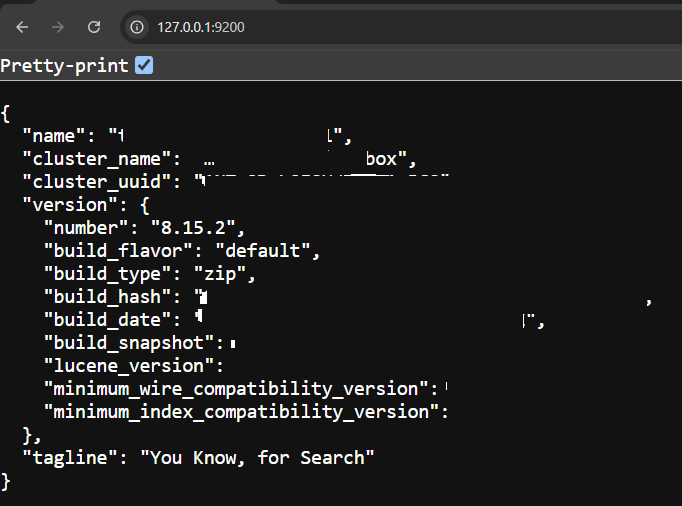
To ensure Elastic Search is successfully installed, open your fav browser and hit the below url http://127.0.0.1:9200 or you can also curl this url from a terminal.
Have Fun with Elastic!
Thank You
If you have reached so far, congratulations. Please feel free to share your thoughts via the comments.
Let's Connect
Feel free to connect with me on LinkedIn and Twitter if you have any questions.
Until Next time!
About the author
Entrepreneur, Founder, Mentor. Also runs a Registered NGO. Visit my website: sandeepgokhale.com
Comments
Join the discussionNo comments yet. Be the first to comment.


